

Rules
The backbone of the Validator module, rules define the criteria that IFC model elements must meet to be considered valid. Each rule is associated with a specific IFC element and checks for specific conditions, such as the presence of required attributes or the correct data type.
Rule Creation
Rules are created using our node-graph configurator. This is a visual programming style editor that allows you to create rules by connecting nodes together. Each node represents a specific condition or action, and the connections between nodes define the flow of the rule.
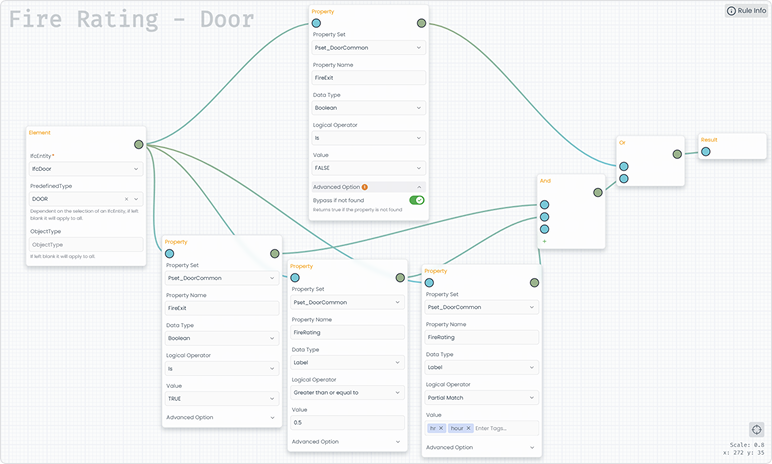
Rules can be designated as Public or Private. Public rules are accessible to all users, while private rules are visible only to you.
You can duplicate any public rule and save it as your own. This is helpful if you want to use an existing rule as a reference and modify it to meet your specific needs.
Nodes
Nodes are the building blocks of the rule. They define the conditions that must be met for an IFC element to pass the rule.
The most basic node are the Element Node, Property Node and Result Node
Element Node: Represents an IFC element in the model. It defines the
IfcEntity,PredefinedType, andObjectType.Property Node: A condition node that checks if an element matching the
Element Nodehas a property that meets the specified condition.Result Node: The endpoint node that completes the rule. Any condition nodes connected to this node will be evaluated.
Element Node
The Element Node is the starting point of the rule. It defines the IFC element that the rule will be applied to.
IfcEntity field is mandatory while PredefinedType and ObjectType are optional.
The following configuration will only applies to IfcWall elements with PARAPET PredefinedType disregarding ObjectType.
- IfcEntity:
IfcWall - PredefinedType:
PARAPET - ObjectType:
blank
Property Node
The Property Node is a condition node that checks if an element matching the Element Node has a property that meets the specified condition.
Property Set: The property set in which the Property Name belongs to. Set this value toAnyand it will find the first property that matches the Property Name disregarding Property Set.Property Name: The name of the property to check. This field is mandatory. This value is case-sensitive. It should be spelt exactly as it is.Data Type: The data type of the property. In IFC schema, there are several data types however we have consolidated them into 3 main types:Boolean: Atrueorfalsevalue.Label: String / Text.Real: Any numerical value (real number).
Logical Operator: The logical operator to use when comparing the property value. Depending on the data type, the following operators are available:BooleanIs: If the property value is equal to the specified value.Is Not: If the property value is not equal to the specified value.Has Value (true or false): If the property value is either true or false.
LabelHas value: If the property value is not empty.Equal To: If the property value is not equal to the specified value.Not Equal To: If the property value is either true or false.Partial Match: If the property value contains the specified value. Exampleangerwill matchdanger.Not Partial Match: The opposite ofPartial Match.Includes: If the property value is one of the input values.Excludes: The opposite ofIncludes.Regex: If the property value matches the regular expression.Greater Than: Convert property value to number and check if it is greater than the specified value.Less Than: Convert property value to number and check if it is less than the specified value.Greater Than or Equal To: Convert property value to number and check if it is greater than or equal to the specified value.Less Than or Equal To: Convert property value to number and check if it is less than or equal to the specified value.Is: Convert property value to number and check if it is equal to the specified value.Is Not: Convert property value to number and check if it is not equal to the specified value.
RealIs Positive Number: If the property value is a positive number. (Greater than 0)Has Value: If the property value is a number and not empty.Greater Than: If the property value is greater than the specified value.Less Than: If the property value is less than the specified value.Greater Than or Equal To: If the property value is greater than or equal to the specified value.Less Than or Equal To: If the property value is less than or equal to the specified value.Is: If the property value is equal to the specified value.Is Not: If the property value is not equal to the specified value.
Value: The value to compare against the property value. This field is required for logical operators that require a value.Advanced OptionBypass if not found: Return true if the property is not found in the element. This for optional properties that may not be present in all elements.
And Node / Or Node
AndNode and OrNode are logical nodes that allow you to combine multiple Property Nodes together. The And Node will only return true if all connected Property Nodes return true. The Or Node will return true if any connected Property Nodes return true.
Result Node
The Result Node is the endpoint node that completes the rule. Any condition nodes connected to this node will be evaluated.